Atelia · Concept
Designing Atelia, a fashion try‑on app that works with any store
You save a dress on one site and a jacket on another, then can't find either when you're ready to buy. Atelia keeps both in one place and shows them on you.
Overview — Answering a brief about AI try-on
The brief was an app that turns clothes you've saved into AI outfit visualisations. The technology already worked, so the first question was where it belongs.
Try-on is arriving inside retailers' own apps, one brand at a time. Atelia sits outside that, so a shopper could hold pieces from several stores against the same body.
Problem — Try-on only matters just before you buy
Three places looked plausible. Managing a wardrobe you already own, showing looks to other people, or the minute before you buy something.
The purchase moment is where intent is already there and confidence is missing, so that's the one Atelia is built for.
Seeing a dress on yourself is useful once, in that minute. An app built only around it has little reason to be opened otherwise.
Solution — One place to gather, try on and decide
So the proposal is a place to keep what you're considering, from wherever you found it. Try-on becomes the last step before buying, and gathering is what the app does the rest of the time.
Gather
Paste a link from any store, or connect a retailer account and bring a whole wishlist in.
Try on
Build an outfit from what you've saved and see it on your own body.
Decide
Size guidance and price sit next to a shortlist you check out from on the retailer's site.
Research — What 41 survey responses and 5 interviews turned up
Saving is scattered across places that were never built for finding things again. People keep clothes in retailer wishlists, screenshots, Instagram saves, browser tabs and Pinterest, and 35% don't organise any of it.
Only 17.5% can find something straight away when they're ready to buy. Most hunt for it first, and the ones who do organise reach for occasion before item type. Collections follow that, so a group is named for a trip or an event.
It started as a try-on tool, and the research turned it into somewhere to put things.
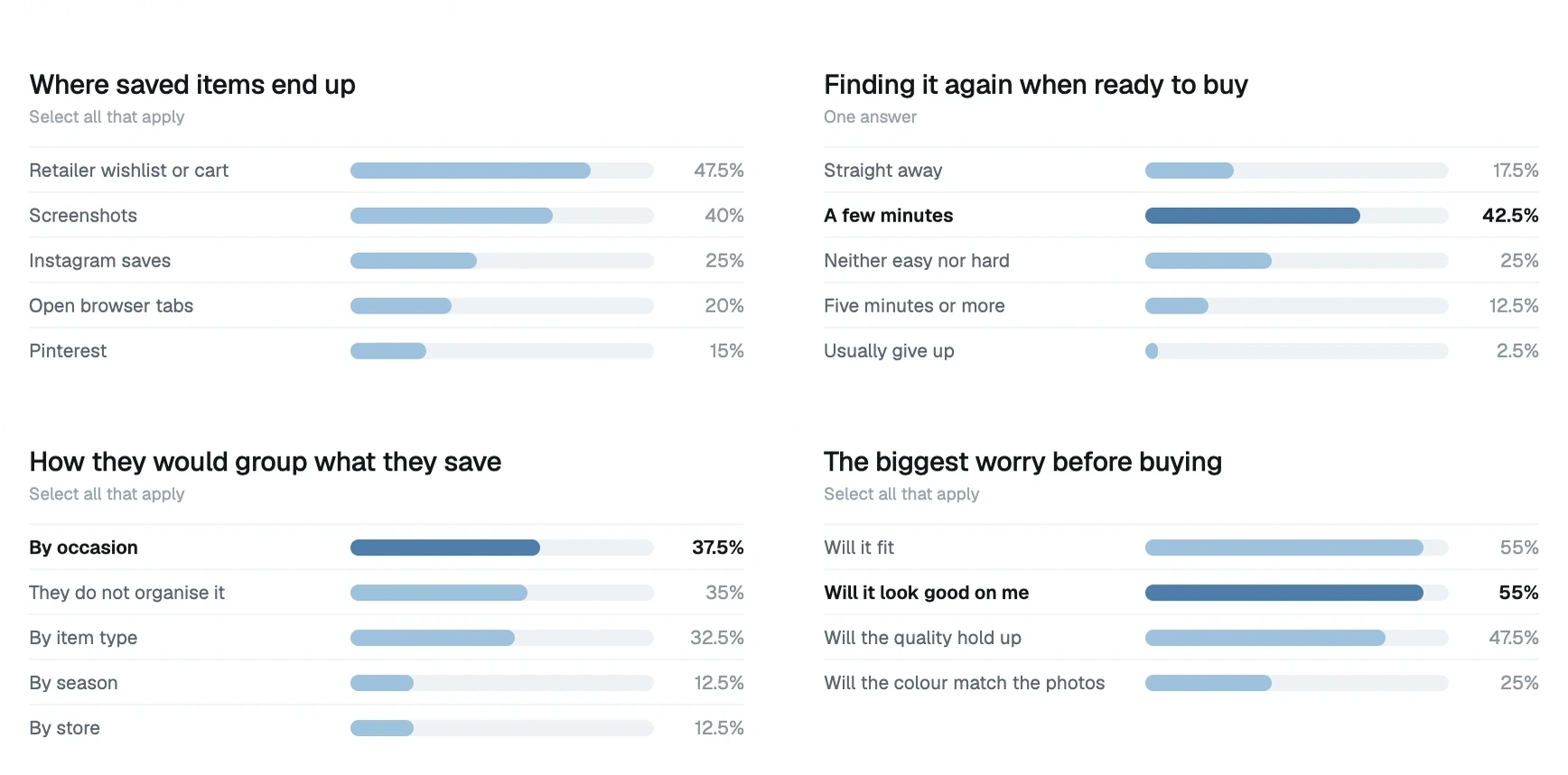
What the surveys and interviews turned up, and the finding the product got rebuilt around.
References — Three things people already do
Shoppers move between three mindsets while buying, and each one already has an app people know how to use.
Collecting
Pinterest and saved posts, where the point is to gather fast and sort later.
Experimenting
Dress-up games, where trying a combination costs nothing and undoing it is instant.
Reviewing
Recipe apps, where an outfit is the dish and the items are the ingredients.
Onboarding — What the app needs before it can do anything
Try-on needs a face and a body, and a recommendation needs some idea of taste. Asking for all of it at the door would end the signup, so it arrives in pieces.
Taste
You tap what catches your eye from a grid of pieces, so the app has something to show you before it knows anything else.
Face
Six selfies, prompted one pose at a time and counted off. Look ahead, turn left, turn right, tilt up, tilt down, slight angle.
Body
Two full-length photos, with the conditions listed before the camera opens.
Each step says what it's for, because people abandon a capture they don't understand.
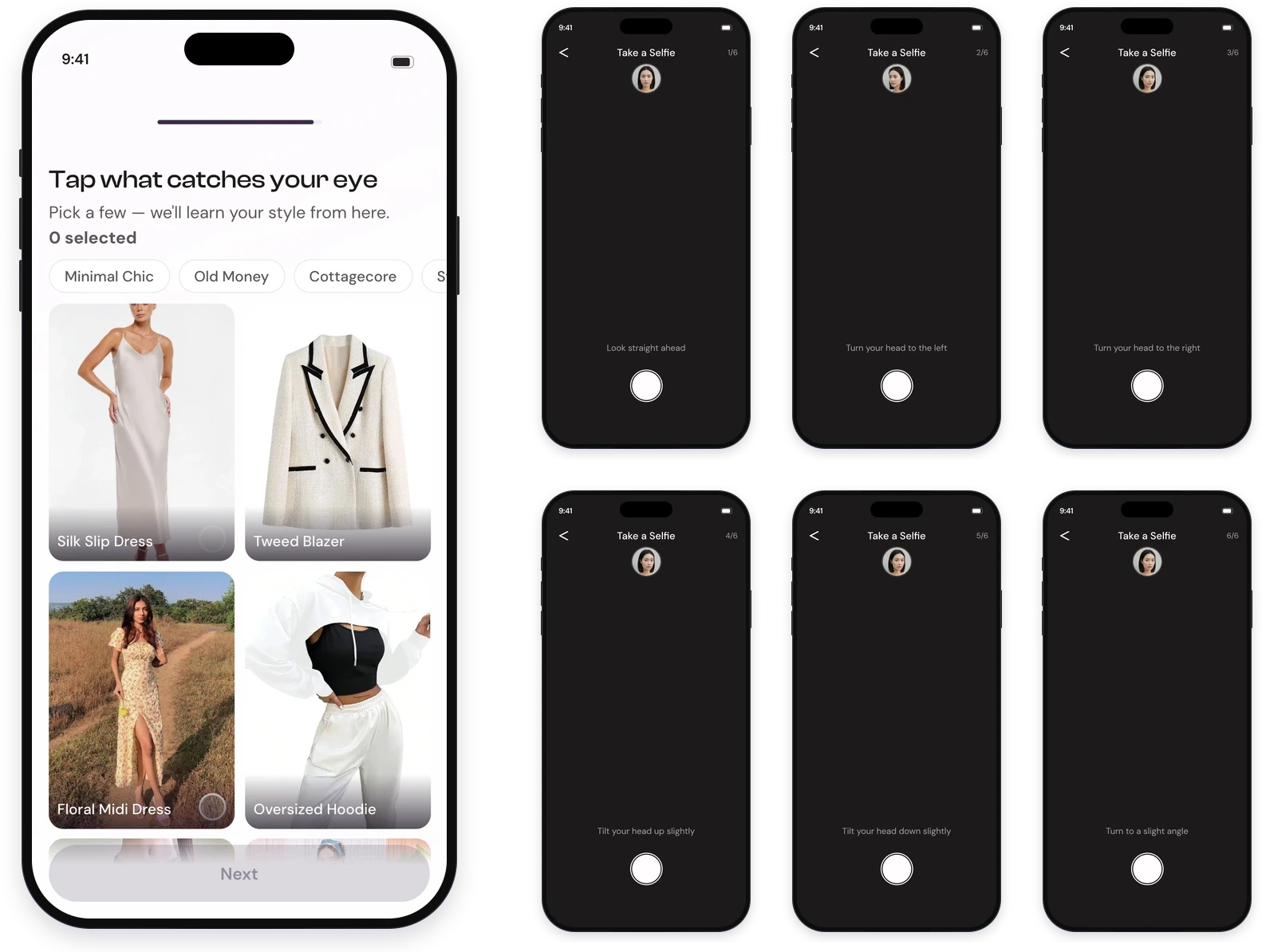
Each pose is prompted on its own and counted, so nobody has to guess what a good photo is.
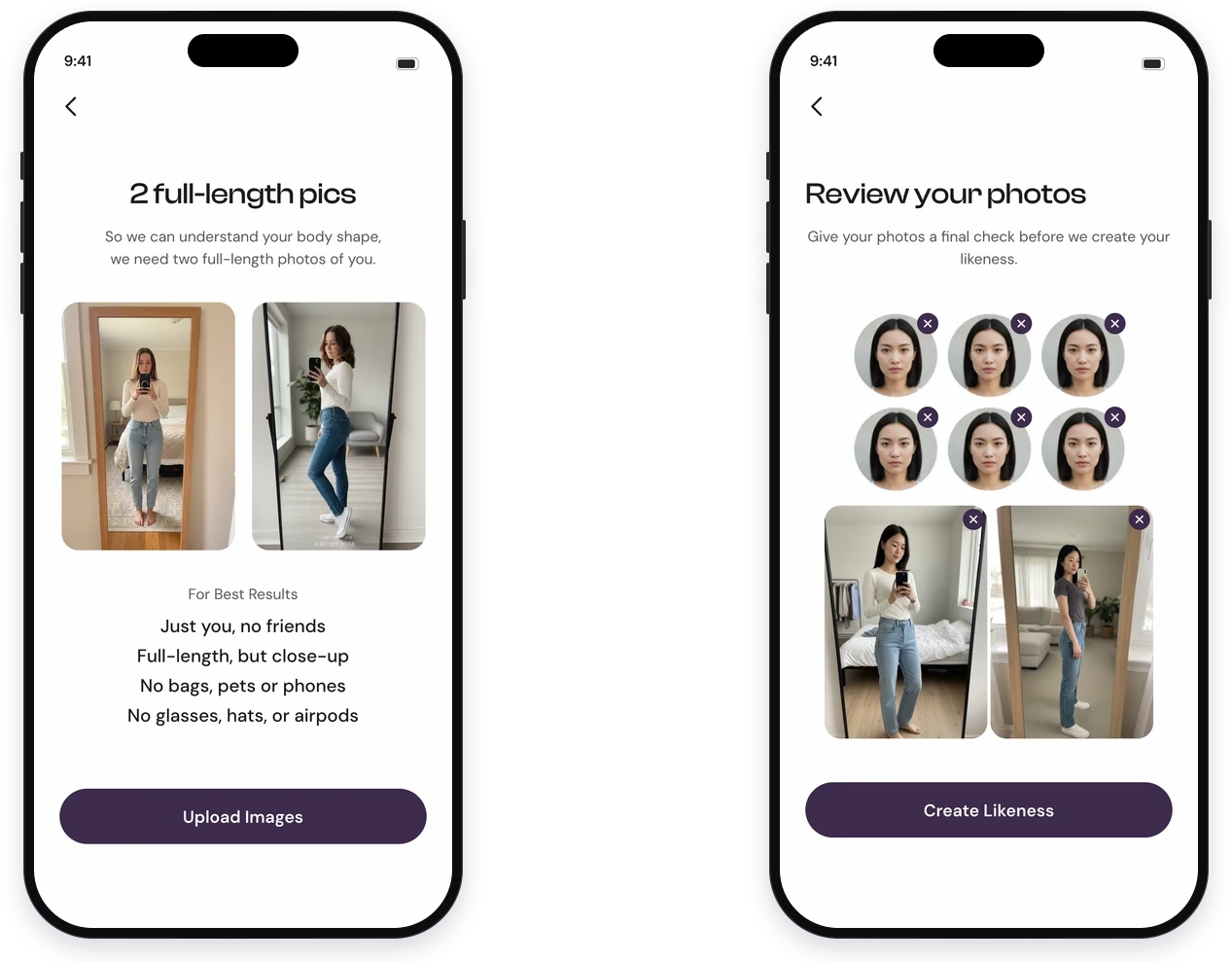
The body capture lists its conditions first, then gives you a last look before committing.
Core Flows — Saving from any store, and building an outfit
Saving works two ways. Paste a product link, or connect a retailer account and bring the wishlist you already keep there.
The first capture says Add and everything after says Save, so the archive and the collections you build stay separate ideas.
Whether collections should be the archive, or sit beside it
- Make collections the default archive. Then saving something and filing it become the same action.
- Auto-create a group for everything saved. The groups feel arbitrary, so you stop trusting them.
- Keep collections user-made, separate from Saved. Matches how people already group things, by occasion, and leaves the archive doing one job.
Connecting matters more than pasting. The research said saves are scattered across retailers, and asking someone to re-paste all of it by hand would only move the problem.
The try-on canvas splits by category and you pick one piece from each. Generating costs credits, and the button says so before you tap it.
How much of the canvas the body should take
- Give the body the full screen. The biggest preview, but you can't see the items you're choosing from.
- A quarter to the body, the rest to the items. A smaller preview, but the items stay visible while you build.
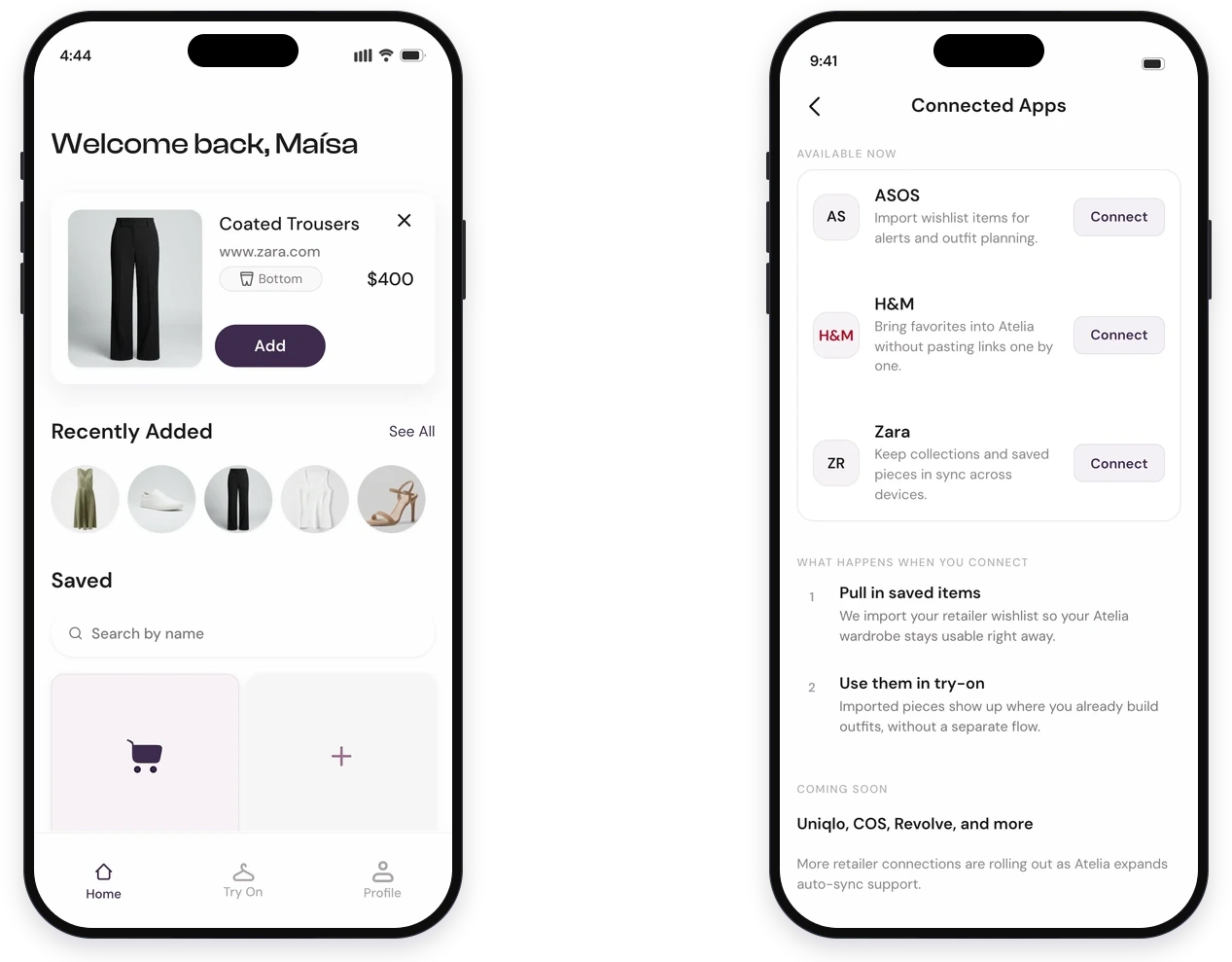
Pasting a link works, but connecting a retailer brings a whole wishlist across at once.
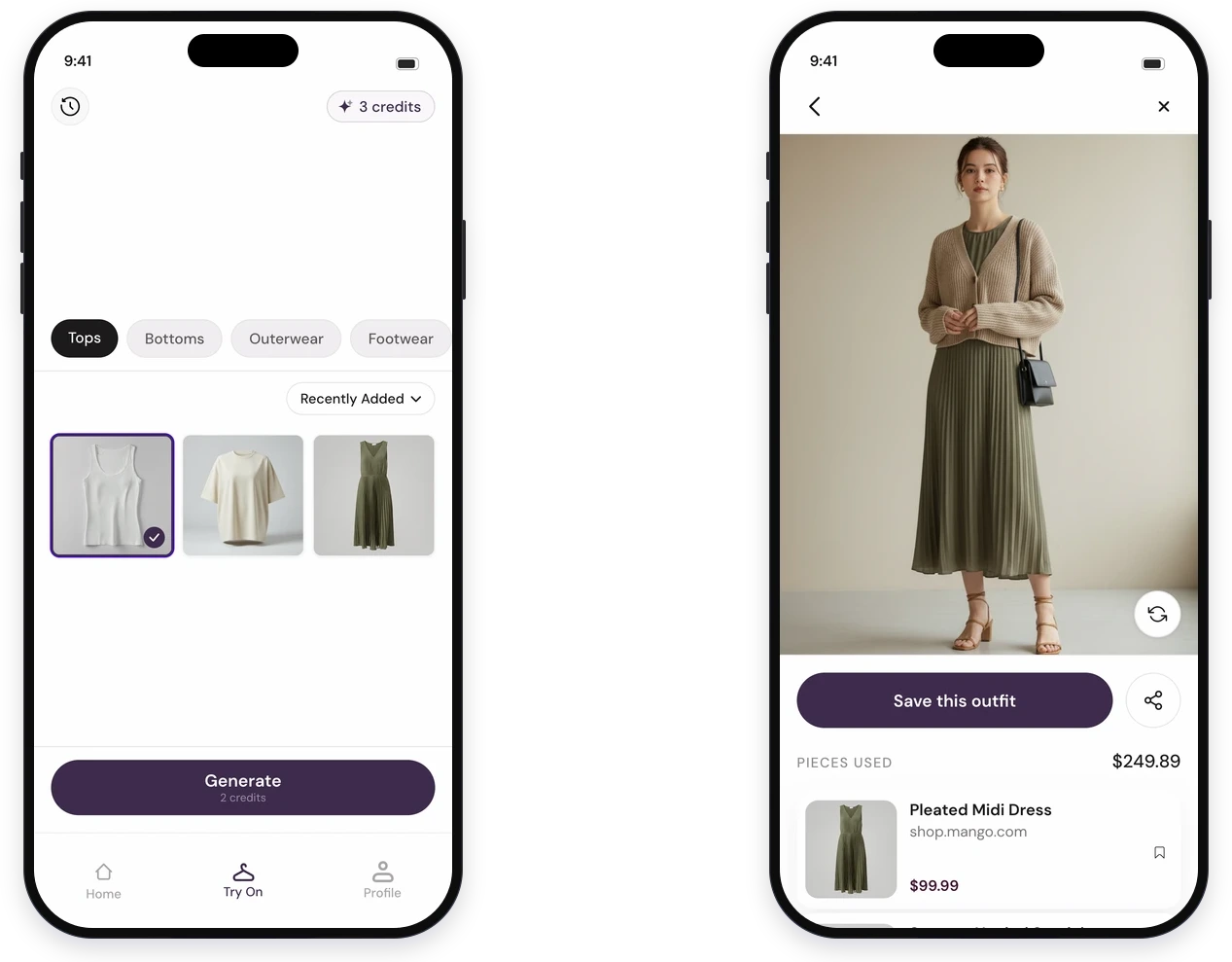
One pick per category, and the result lists every piece with its retailer and price.
Iterations — Rebuilding the product three times
Three earlier versions came before the one above. Each broke for a different reason, and each reason changed what I built next.
Shopping platform
The first build was a store. You browsed a catalogue inside Atelia, tried things on, and checked out without leaving the app.
It didn't work. A closed catalogue can't match real retailers on stock, price or delivery, and payments and fulfilment added operating weight a concept couldn't carry. It also worked against how people already shop, which is across several stores at once.
Dropping it set the direction. Atelia became a layer that works across retailers, and the rest of the design follows from that.
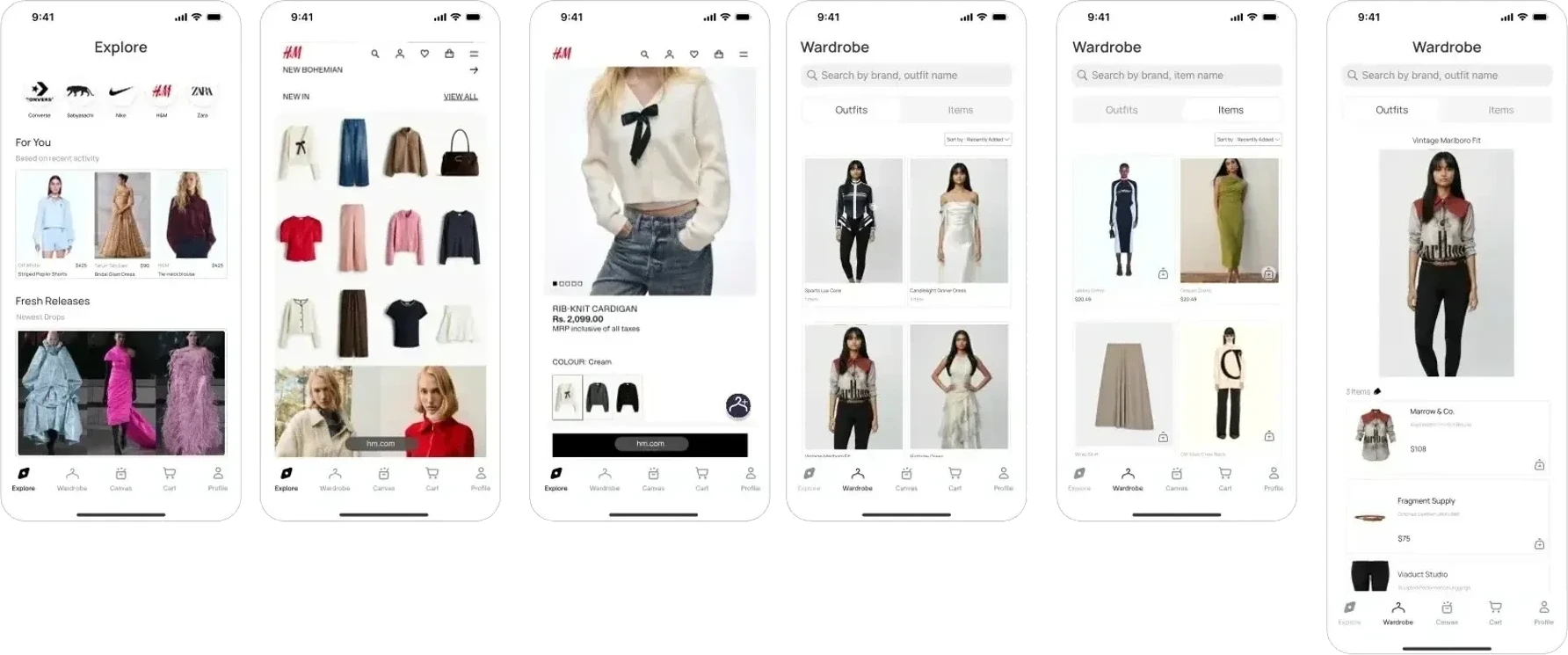
The store version: a catalogue you browsed inside the app, with a Cart in the tab bar.
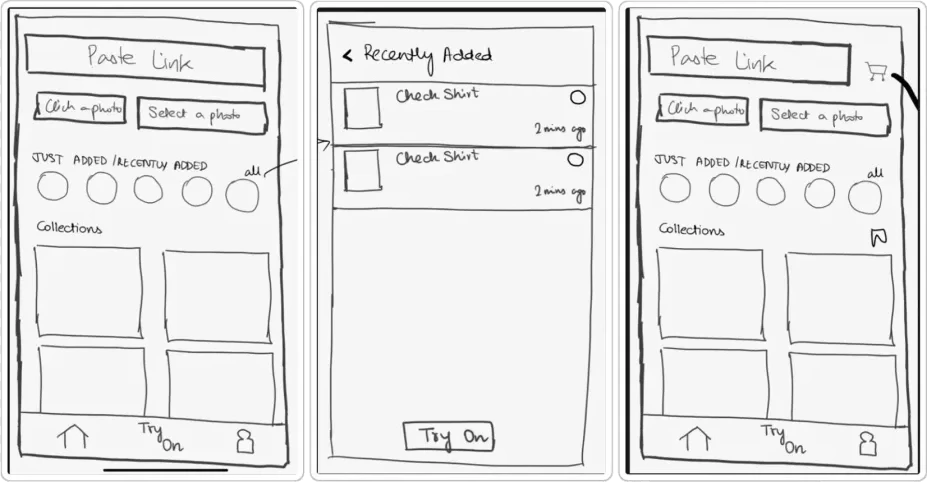
The first pass on paper, testing whether a pasted link could carry intake and where history belongs.
Try-on across tabs
Try-on actions were spread across different tabs, so tapping one could switch you to a tab you hadn't picked. People lost their place, and the same problem appeared in several different flows.
A tab is a destination someone chose. An action shouldn't move them out of it, so actions now resolve inside the current tab.
A single Save action
Save was doing four jobs at once. It took an item into the app, held it in the archive, put it into a collection, and kept a finished outfit. Nobody could tell which one they were doing.
Splitting it was mostly a naming problem. Add captures, Saved archives, Collections group, and Save Outfit keeps a result.
Deciding — Size, price, and what you actually buy
Atelia stores your measurements, so an item page can suggest a size against your height instead of a generic chart.
Price alerts sit on the item and on the collection, because a lot of saving is waiting for a sale.
The To Buy list groups by retailer, since checkout still happens on their site. Atelia gets you to the decision and hands you over.
Try-on is a styling preview. It shows how a piece looks on you, and it doesn't promise the fit.
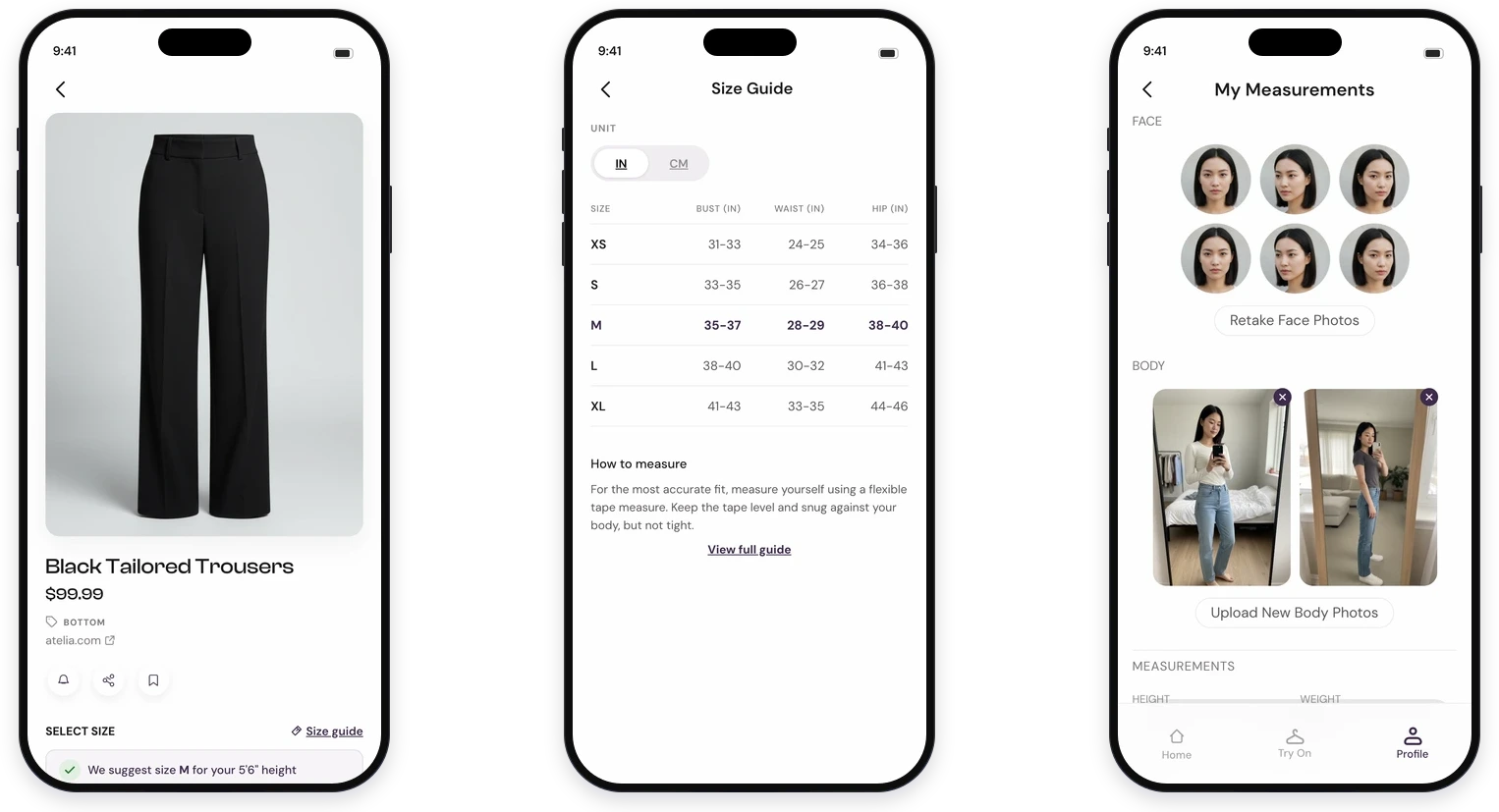
The size suggestion reads off your stored measurements rather than a generic chart.
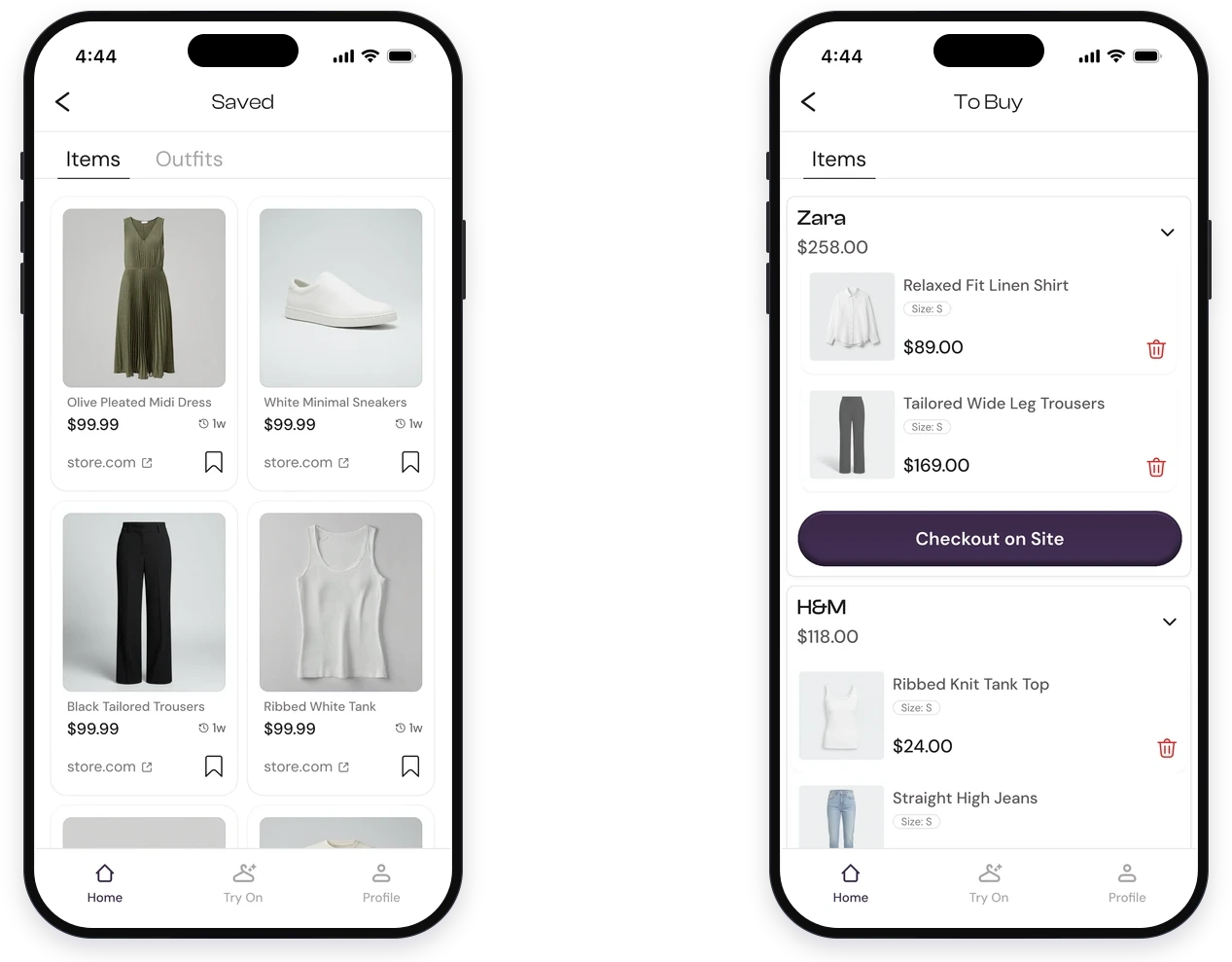
To Buy groups by the store you'll check out on, because that's where the purchase happens.
Reflection — What I learned
The feature people talk about is rarely the one holding the product together.
Try-on is what makes someone download this. Saving, sizing and the To Buy list are what would make them open it again.
Concept work still needs a real problem.
The research changed what this was before any screen got designed. Starting from screens would have produced something that looked finished and answered nothing.